
Your AI Isn’t Stupid.
When an AI agent gives the wrong answer, the model may not be the problem. A real debugging story shows why developers should check what the model actually received before rewriting the prompt.

Your Retrieval Layer Might Be.
By Prateek Sharma, MCA
Before you rewrite the prompt, ask one question: What did the model actually see?
We spent real time debugging an AI agent that couldn't find certain buildings.
From the outside, the diagnosis seemed obvious.
The AI was being stupid.
Except it wasn't.
The model was doing perfectly reasonable work with the information it had been given.
The problem was that we weren't giving it the right information.
The Model Never Saw It
We were building Bradley, a conversational facilities management assistant.
A user could report a problem in ordinary language, and the system needed to identify the correct building, floor, area, and service category before creating the work order.
That meant retrieval mattered.
A lot.
At one point, certain buildings simply couldn't be found.
We had a good search engine. The data was there. The user's search made sense.
And yet the agent kept getting it wrong.
So naturally, you start looking at the AI.
Is the prompt bad?
Does it need more context?
Should we change the instructions?
Do we need a better model?
Maybe.
But none of those was the problem.
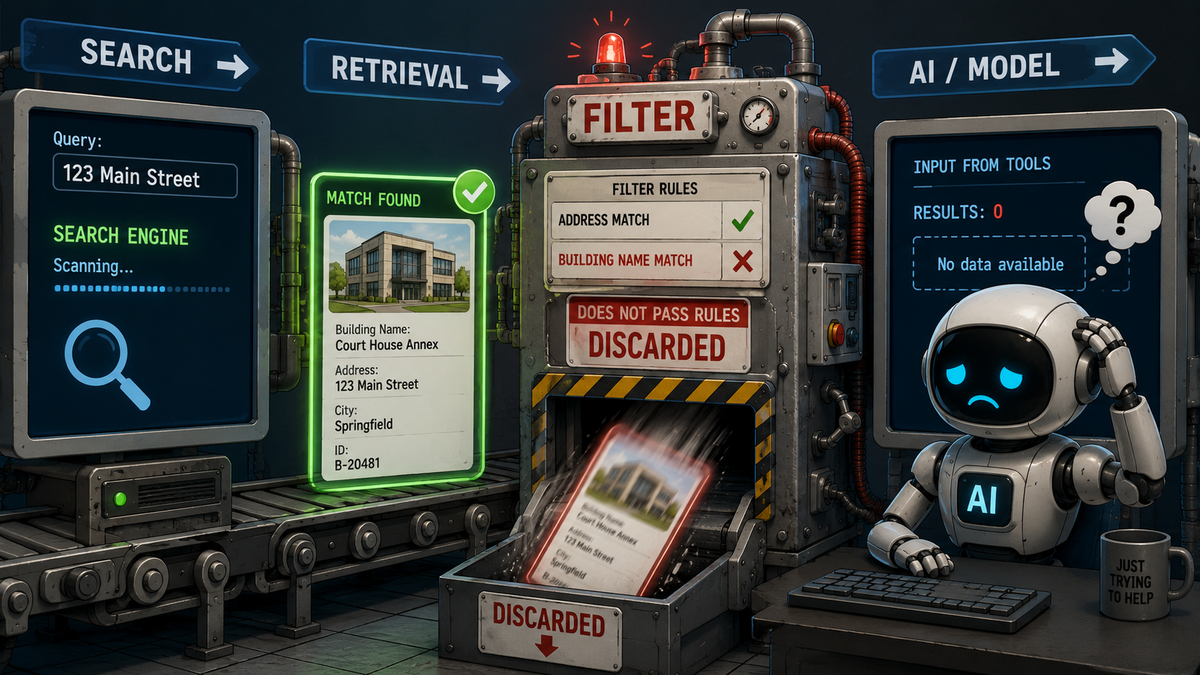
The search was actually finding the building.
Then our own code threw the result away.
The Dumb Part Wasn't the AI
A post-search filter was checking only the building name field.
So if the search engine found the correct building because the address matched, the result could still get discarded before it reached the model.
The search worked.
The model could have worked.
The plumbing between them didn't.
But from the user's perspective?
The AI looked stupid.
That's an important distinction because AI systems have a lot of moving parts, and the model is only one of them.
There's the prompt.
The retrieval layer.
Search.
APIs.
Filters.
Business rules.
Tool calls.
Data.
Whatever preprocessing and post-processing somebody decided was a good idea six months ago.
And eventually, somewhere at the end of all that, there's a model trying to answer based on whatever survived the trip.
What Did the Model Actually See?
That question has become one of the most useful debugging tools I've learned:
What did the model actually see?
Not what was in the database.
Not what the search engine returned.
Not what you intended to send it.
What actually reached the model?
Log the tool call.
Log the result.
Look at the data.
Then start changing things.
Because an AI assistant is very good at generating plausible theories about why something went wrong.
Developers are pretty good at that too.
Logs are less imaginative.
And sometimes the AI that looks stupid is doing exactly what it should with exactly what you gave it.
The stupid part may be upstream.
Want to know more? See the White Paper here: https://blog.protovate.ai/we-stopped-paying-per-token-and-put-the-models-on-our-own-machine/
Originally published on Protovate.AI
Protovate builds practical AI-powered software for complex, real-world environments. Led by Brian Pollack and a global team with more than 30 years of experience, Protovate helps organizations innovate responsibly, improve efficiency, and turn emerging technology into solutions that deliver measurable impact.
Over the decades, the Protovate team has worked with organizations including NASA, Johnson & Johnson, Microsoft, Walmart, Covidien, Singtel, LG, Yahoo, and Lowe’s.
About the Author

Share article


